Meta Ads CRM Integration in 2026: Track Qualified Leads, Not Just Forms

Meta lead ads can generate a steady stream of form submissions, but a submitted form is not the same as a qualified lead, a sales opportunity, or a customer. If your CRM records what happens after the form is submitted, you can measure those outcomes and, where your campaign type and account are eligible, send appropriate conversion feedback back to Meta.
This guide explains the practical workflow, what to measure, how to troubleshoot data quality, and when a CRM integration is worth prioritizing. Product interfaces and eligibility rules change, so use Meta's current documentation and the options shown in your own Ads Manager before implementation.
What a Meta Ads CRM integration actually does
A basic lead retrieval integration sends new lead details from Facebook or Instagram lead forms into a CRM so the sales team can follow up. A conversion-feedback integration goes a step further: it records subsequent lead stages in the CRM and sends eligible events back through Meta's Conversions API for CRM workflow. These are related but different jobs. A lead can arrive in the CRM correctly even when downstream event feedback has not been configured.
Why optimize beyond form submissions?
When the only tracked outcome is a form submission, campaign reporting can reward volume even if many submissions are unreachable, irrelevant, duplicate, or outside your target market. A CRM provides the context needed to compare the quality of leads generated by campaigns, ads, offers, and audiences.
The aim is not to tell Meta every detail stored in your CRM. It is to define a small set of meaningful, eligible events and share only the information permitted by Meta's policies, your consent choices, and applicable privacy requirements. Never send sensitive information simply because a field exists in your CRM.
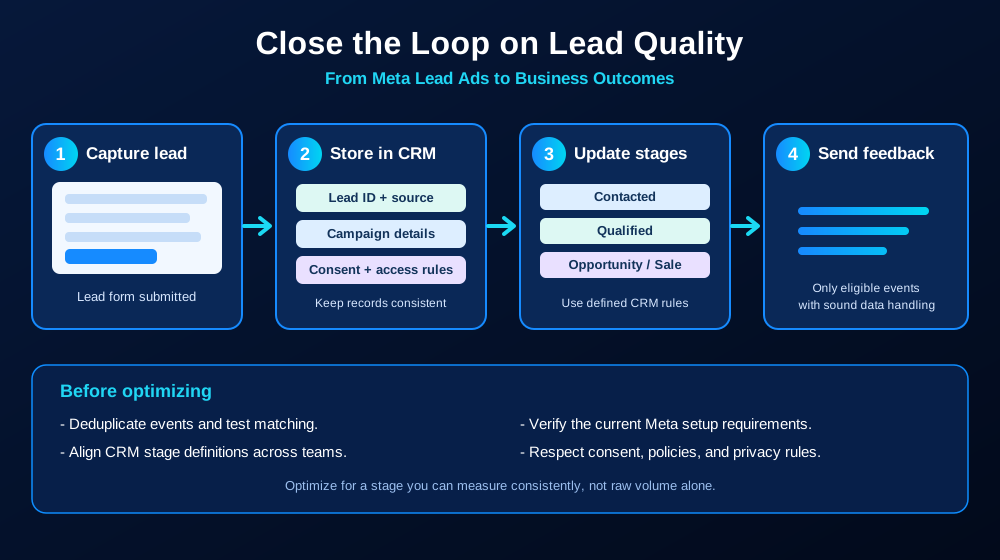
The four-part workflow
1. Capture the lead reliably
Connect Instant Forms to your CRM using a supported partner integration or a maintained custom workflow. Confirm that new submissions arrive promptly, required fields map correctly, and failures are visible to someone who can fix them. If your leads come from website forms instead of Meta Instant Forms, confirm the appropriate tracking and event path; do not assume the same lead-form integration applies to every source.
2. Preserve source and matching information
Keep the platform's lead identifier when provided, along with campaign, ad set, ad, form, timestamp, and lead-source fields that your workflow needs. Map fields consistently and restrict access to the people who need the data. Avoid copying unnecessary personal details into URLs, analytics labels, or free-text event parameters.
3. Define the CRM stages before sending events
Use clear, operational definitions for each stage. For example, 'Contacted' might mean a documented two-way response, while 'Qualified' might require agreed fit criteria such as service need, geography, or budget. 'Appointment booked' and 'Opportunity created' should each have a rule the sales team can apply consistently. Do not rename the same outcome across teams and then compare the counts as if they were equivalent.
4. Send only eligible, tested conversion feedback
Use Meta's current Conversions API for CRM documentation to confirm supported campaign types, event structure, identifiers, permissions, and matching requirements. Test with a small sample, check diagnostics, and verify that a single CRM change does not create duplicate events. A successful API response alone does not prove that every event matched or that campaign optimization is using it as intended.
Which metrics should you track?
Use the CRM and ad reports together. These measures answer different questions, so keep their definitions visible in your reporting.
Lead delivery rate: percentage of submitted leads that arrive in the CRM with the required fields intact.
Contact rate: share of leads with a documented successful contact attempt or two-way conversation, using your team's defined rule.
Qualification rate: share of leads that meet your agreed fit criteria.
Appointment or opportunity rate: share of leads that progress to the next meaningful business stage.
Cost per qualified lead: ad spend divided by qualified leads for the same attribution window and reporting period.
Cost per opportunity or customer: ad spend divided by the downstream outcomes you can reliably attribute.
These are internal operating metrics, not universal benchmarks. Compare like-for-like date ranges, allow for the time it takes leads to progress, and document whether the denominator is leads created, leads contacted, or leads that reached a particular stage.
A practical setup checklist
Confirm whether the campaign uses Meta Instant Forms or website forms and choose the correct integration path.
Document each CRM stage and the event that should be sent when the stage changes.
Check that the lead identifier and source fields persist through the CRM workflow.
Set up monitoring for failed syncs, missing fields, delayed events, and duplicate events.
Test the complete path from a test lead through CRM updates to event diagnostics.
Check current Meta eligibility and account requirements in official documentation and Ads Manager.
Review data access, consent, retention, and privacy restrictions before sharing any customer data.
Common problems and how to diagnose them
Leads appear in Ads Manager but not in the CRM
Check connector permissions, form access, field mapping, sync errors, and whether the CRM integration is still authorized. Test with a new lead after fixing the issue rather than assuming old submissions will be reprocessed automatically.
CRM stages update but Meta shows few matched events
Check that the correct identifier is stored, event names and required fields follow the current specification, timestamps are valid, and events are not being dropped or duplicated. Review the relevant diagnostics and confirm that the integration is configured for the campaign type you are running.
The cost per lead improves but sales quality does not
Check the offer, form friction, targeting, follow-up process, and qualification definition. Do not judge a change on the first few leads if your sales cycle is longer. Use the same stage definitions and compare downstream outcomes over an appropriate period.
How this differs from website conversion tracking
Website pixel or Conversions API events typically describe actions on a website or app. CRM feedback describes what happened later in the sales process. Depending on your lead source and campaign setup, the right design may use one path, the other, or both. Avoid sending duplicate versions of the same business outcome without a deduplication plan.
Privacy and policy considerations
A CRM may contain personal, financial, employment, health, or other sensitive information. Do not export entire CRM records into advertising events. Decide which events are permitted, minimize the data shared, respect consent and access controls, and review the platform's current terms and policies. For healthcare organizations, tracking and ad-event design require additional privacy review; this guide is not a statement that any particular setup is compliant.
How to measure the impact after launch
Establish a baseline before changing the integration. Track sync reliability, lead stage coverage, cost per qualified lead, cost per opportunity, and eventual revenue where available. Annotate the date the integration changed, allow time for lead maturation, and compare similar campaigns and time periods. If the CRM data is incomplete, fix data capture before drawing conclusions about the ad platform.
Frequently asked questions
Does connecting a CRM automatically make Meta optimize for qualified leads?
No. Lead retrieval and conversion feedback are separate tasks. Optimization options depend on the campaign type, setup, account eligibility, and current Meta requirements. Verify the option in Ads Manager and confirm that events are being received and matched.
Can I use this for website leads?
Website leads can be measured with appropriate website and server-side event setups, but the specific CRM workflow used for Meta Instant Forms may not apply. Choose the implementation documented for your lead source.
Should every CRM stage be sent to Meta?
Not automatically. Define meaningful events, check the current supported specification, and send only eligible information needed for measurement and optimization. More events are not helpful if they are inconsistent, duplicated, or inappropriate to share.
How often should the integration be checked?
Monitor sync failures and event diagnostics continuously where possible, and review stage definitions and data quality on a regular schedule. Recheck the setup after CRM changes, new forms, permission updates, or platform policy changes.
Key takeaway
A CRM integration is most useful when it closes the loop between an ad lead and a clearly defined business outcome. Keep lead data structured, define stages consistently, test event delivery and matching, and measure qualified outcomes rather than assuming every form fill has equal value.
Book a Free Consultation
Want help connecting Meta lead generation to a reliable CRM measurement process and improving the quality of the leads your team follows up?

Comments